This week I submitted my Advanced Diploma’s 2nd year final project, dubbed ‘SPGX’ (Space Game X). Technical details will follow at a later date.
More info available here.
This week I submitted my Advanced Diploma’s 2nd year final project, dubbed ‘SPGX’ (Space Game X). Technical details will follow at a later date.
More info available here.
A lot has changed since the last post – the flight system has been nailed down and work has begun on physics networking, with content creation supported by our rapid-iteration process. Because these systems have been discussed in detail in technical documentation, some of the following information will be quoted in the interest of accuracy and time.
In order to quickly produce and test in-game objects such as ships, guns, and bullets, a pipeline has been created that allows for simple derivations that result in divergent behaviours. The following diagram is a quick look at our current project structure (click for a better view).
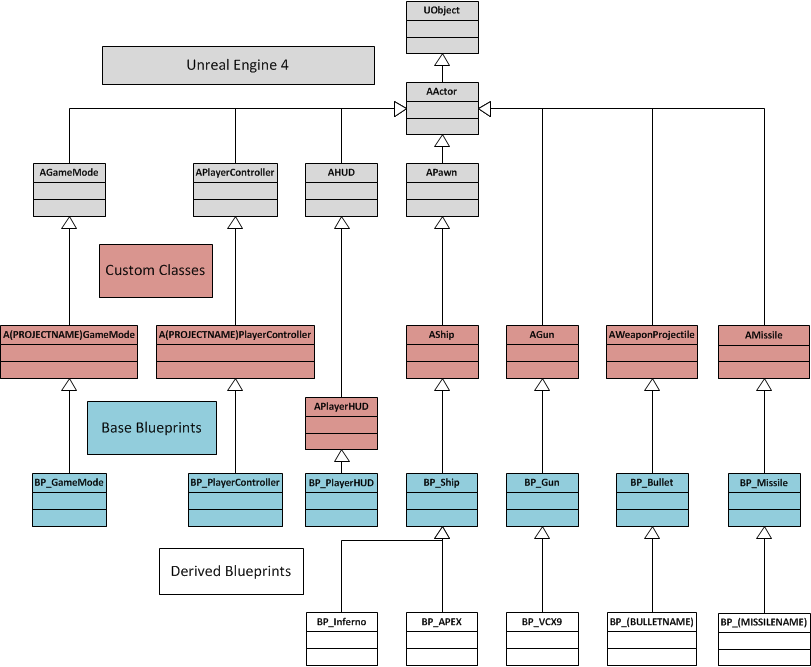
Core C++ functions are exposed to blueprints via the UCLASS, UPROPERTY, and UFUNCTION macros, which act as a kind of access specifier (see https://docs.unrealengine.com/latest/INT/Programming/UnrealArchitecture/Reference/Functions/index.html). It is this system that has allowed for such flexibility – the custom classes listed in the above diagram consist of core functionality needed for all deriving objects – the AShip class, for example, contains the methods that control the application of thrust and torques to actually fly the craft.
The base blueprint layer allows for core functions to be called easily whilst still defining base behaviour – all spaceships will call the functions to thrust forward when the forward key is pressed, for example, so the base level of blueprints handles this reaction. The deriving blueprints simply alter the UPROPERTY variables, such as the ship’s maximum thrust values (MaximumForwardThrust and so on), which define the ship’s flight characteristics. The mesh is also chosen at this level, and cameras re-positioned to match.
Player input is primarily handled inside the BP_PlayerController object, where messages received from the input manager are processed, and turned into events that the player’s ship utilizes. This is done through a variety of Blueprint-based interfaces, such as BPI_FlightControl, which features events pertinent to flight management such as thrusting and rotation control. These events specify the functions that any implementing object has to define.
BPI_FlightControl’s PitchEvent.
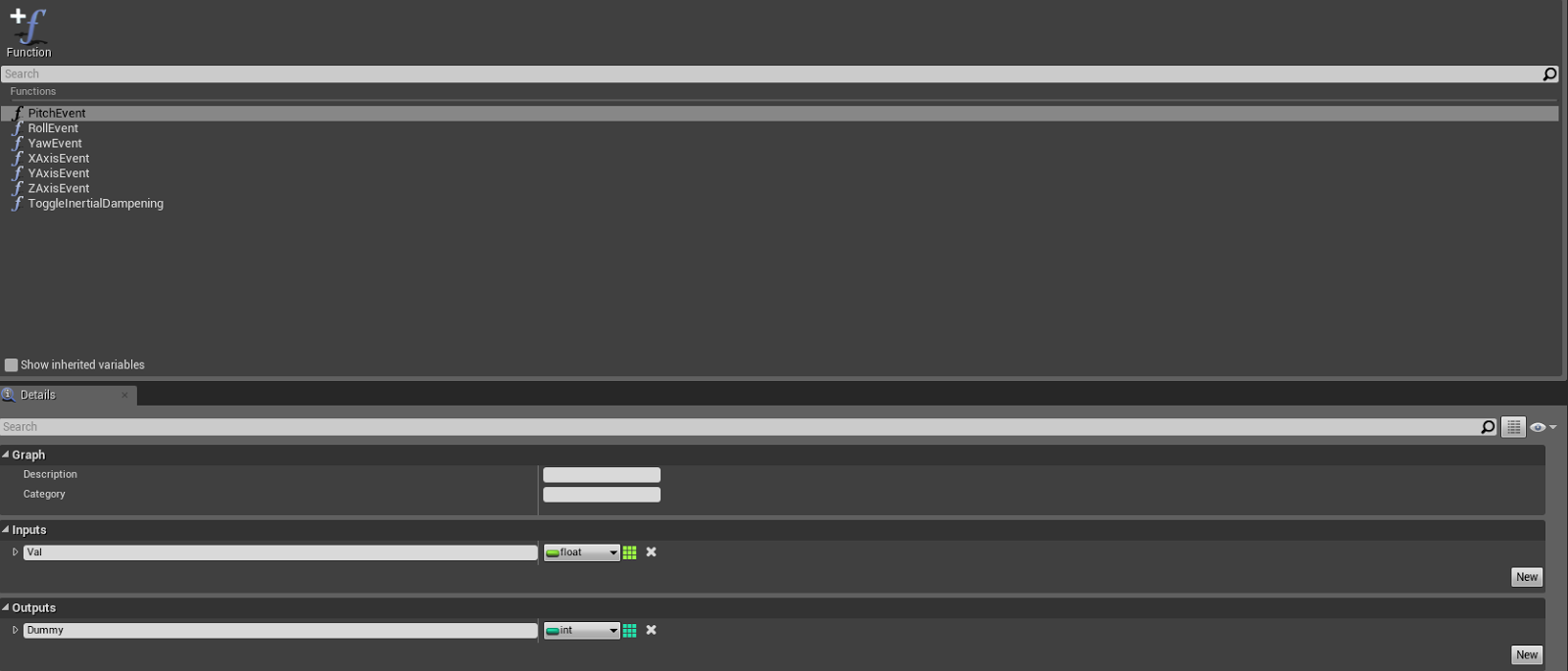
Note the ‘Dummy’ parameter. As of v4.3, this is required to have the implementing function appear in the Pawn’s blueprint.
When the controller despatches an interface message, a Pawn object is required as a parameter (separate to those defined in the interface’s own blueprint fields). As this specifies the pawn that will receive the message, the controlled Pawn should be used (GetControlledPawn node).
For brevity’s sake (particularly when doing server-based physics, and thus with ships transmitting their own physics information to the server), if an input is received with a value of 0, it is discarded. This is necessary due to the functionality of AxisEvent messages, which are received every frame regardless of their contained value. Overall event traffic is reduced, as is the number of packets transmitted over the network.
Physics for the client’s locally-controlled Pawn is computed on the local machine, with its location, rotation, and linear and angular velocities transmitted to the server on a regular basis. This information, upon being altered on the server, will replicate to all non-owning clients, and thus other players will see each others’ movements.
In the above setup, the server still needs to preside over all collision checks in order to maintain consistency. As a result, all clients have Ship collision disabled, and the server will, upon detecting a collision, transmit the impact location and normal to the offending client, which will use this information to modify the local Pawn’s physics information.
The above solution is not without its issues, though, as integrating an externally-calculated physics collision with a local simulation is quite a task, let alone one done smoothly and without the player noticing. At this point, full server-side physics computation, even with the client-side prediction needed to make it possible, could well be less arduous, and far more practical. This decision will have to occur at a later date when the nuances of other in-game elements, and how they interact in a networked situation, become apparent.
This could be said for the entirety of the project, however. There is a significant investment in the R&D area of production, but it seems to be paying off – we can rapidly iterate on existing ideas, network multiple clients together, see synchronized shooting effects across the network, and so on. These developments will only continue to improve.
I’ve spent the last five or so weeks prototyping game ideas for the final project portion of my Adv. Diploma’s final year. The first few weeks were more of an ‘R&D’ period as myself and my artist (Eric Fear) adjusted to using Unreal Engine 4. As a result, we possess two prototypes.
The first – and more advanced – project was that of a multiplayer space shooter, similar in control scheme to Space Engineers and inspired by the X3 series by Egosoft. This has been a wonderful test bed for networking, Blueprints (UE4’s visual scripting language), exposing C++ functions and properties to Blueprints, the various in-editor tools, and so on. As this is the prototype with which we’re going forwards into our major production, it will be the focus of this post as well as of those to come.
The first programming hurdle was the flight model and control mechanics. Some games allow the player to maneuver through space like a jet fighter, with no explanation as to how, or the ability to switch to a less ‘hampered’ style of flight. We decided we would like a toggle-able inertial dampening system (IDS), which would, as the name suggests, cancel or dampen the craft’s inertia.
Whilst this doesn’t sound significant, imagine this – your craft is thrusting forwards, then pitches up while continuing to accelerate forwards in the new direction. Because your inertia from the original direction still exists, you will perform a very large ‘fish-tailing’ curve, where the craft drifts out and around in a wide arc until the new direction’s thrust and various adjustments cancel out the original direction. This is made worse by the fact that every ‘moment’ of the pitching maneuver is a new direction of thrust, all of which must be cancelled out a later stage if the craft is to fly ‘straight up’ (in terms of the world, not its own relative ‘up’).
Using the IDS, however, will make the guidance system counter-thrust against any inertia in a direction into which the pilot is not directing the craft to thrust. I.e. in the above scenario, relative to the craft, you will still have a ‘downwards’ inertia (the original ‘forwards’) at each moment of pitching. Because you’re not pressing the relevant key to thrust downwards, the IDS will cancel out that thrust by pushing you in your relative ‘upwards’, and thus into the curve, allowing for more complex maneuvers typical of modern day aircraft, such as banking turns and loops.
Due to the ease by which blueprints communicate with and inherit from C++ classes (a subject I will examine in a later post), rapid iteration on pre-existing ships is made simple – change the mesh and the flight variables (i.e. maximum thrust values, mass), and the ship will look and feel different. The base class, Ship, contains functionality needed by all spacecraft, such as thrusting, and the IDS, and uses the variables exposed to Blueprints as a way to control how these operate, such as the maximum thrust values being used to clamp the amount of force actually being applied to the craft. This technique is not just useful for the creation of new objects, but also as a way to quickly tweak pre-existing ones. The following video represents the most recent take on flight mechanics for the APEX Interceptor.
In the posts to come I will discuss other technical issues that I faced, such as the general C++ to Blueprint pipeline, shooting, and the woes of networking.
For my latest assignment at AIE, I had to, based on the elective I chose, develop an AI simulation where agents either competed or cooperated toward the completion of a goal.
In my case, I decided to create a dogfighting simulator, where AI entities flew spaceships through a 3D space, acquiring targets and engaging them with their gun-based weapons, dodging incoming rounds, and avoiding friendly-fire.
The entities seen in the video operate using a simple Behaviour Tree structure, through which the program traverses, evaluating the nodes in a depth-first, left-right order. In the following diagram, diamonds indicate selector nodes, rectangles sequence nodes, and spheres simple behaviours (either conditions, denoted with an is, has, or are prefix, or actions). More details on the nuances of different behaviour trees are available on http://aigamedev.com.

In this approach, courtesy of Conan Bourke, lead programming teacher at AIE Sydney, sequences begin with the conditions that are required for subsequent actions later in the sequence. This is as opposed to the placement of conditions within the sequence nodes themselves. This method results in nodes that are rather lightweight and flexible – each sequence is just a container of other Behaviour objects through which the Execute method traverses, returning a failure result as soon as one of the children behaviours fails.
The selector nodes will simply traverse each of its branches from left to right, returning a successful result as soon as one of its children reports success. Because a failure will lead to the exiting of the entire branch under evaluation, a selector will, as the name suggests, select a branch or path, and continue down it as long as it remains true.
Both types of composite nodes may contain an unlimited number of children. However, an excessive number of sibling nodes may indicate poor design. In this case, one could try to separate this large grouping into different composite groups, which are then added to the tree in a more elegant manner (as is often the case when using composite nodes), and executed as per the normal behaviour tree process.
In the above diagram, the IdleCatch behaviour will ideally never execute until all enemies are destroyed. This was not always the case, however, as the final behaviour was slightly tweaked – the combat sequence was brought up one level. This meant that the Fire behaviour would execute even when the target was outside the range used to decided whether or not the agent should seek to said target. If this wasn’t done, ships would often end up aligning with their targets but refusing to shoot. As a result, if IsAligned failed, the Steering sequence would fail, and thus the entire SubRoot selector. If IdleCatch wasn’t present, the tree would return a failed traversal, which is an indicator of a malfunctioning and/or poorly designed tree.
If time constraints hadn’t taken their toll, I would have re-factored some of the Steering sequence, as there are some inconsistencies – there are two alignment behaviours that often occur in sequence, meaning the ship would rotate at twice its permitted rate, and the computations contained within would have to be executed twice. This might not seem like much, but when the simulation permits the user to add as many ships as desired, i.e. several hundred, this could well make a difference.
Additionally, if this unrealistic lack of deadline was to exist, a redesign would mean that the IdleCatch behaviour would only execute when all enemies were destroyed. Alas, this was not the case. Regardless, the ships performed as expected, as the potential failure points within the Steering sequence were mostly after any relevant code, and thus nothing of importance was skipped. Still, a design flaw indeed.
Inspired by Jeff Orkin‘s presentation – Applying Blackboards to First Person Shooters (PDF download warning) – I wrote a similar blackboard system for inter-agent coordination. Some of the methods include counting records of a particular type, replacing a particular record, or adding a new record. The behaviours in the tree above use this system extensively – the ScatterTargeting behaviour, for example, will count every BB_EnemyID record in its team board, and then the number of BB_Attacking records against each of these IDs, finding the least-targeted ID and writing in a record for itself attacking this particular ship. In this way, the ships on each team spread out in their targeting of enemies, and indicate their selection to their teammates via a BB_Attacking record.
In order to not accidentally engage friendly forces, all entities first execute the ClearFireLine behaviour before actually firing. This performs a Ray->Sphere intersection test between the hypothetically-fired bullet and all friendly ships’ collision spheres within a certain range, and applies a perpendicular force to the ship in question if an intersection is found, so that it may move out from behind said ally. This behaviour alone dramatically decreased the incidences of friendly-fire, even with teams of 50+ ships.
The systems I’ve described above came together to provide dynamic decision making and limited inter-agent coordination in a fast-paced 3D environment. I learned a lot as a result of development, despite its faults, and may well use it as a test-bed in future AI research.
 Brody Higgerson